
Deploying to a server
@basaltkit/deploy deploys a Basalt app to a single Linux server. One command covers the .env, the Docker infra (Postgres, Redis, SeaweedFS), the build, a database dump before migrating, the migration, PM2 or Docker Compose, Apache or Caddy, a health check, and a rollback when the new release does not answer. @basaltkit/deploy-ui is an optional web UI for it. It runs on your machine and drives the same commands over your own ssh.
This guide follows one app, acme, from a fresh server to everyday deploys: first from the terminal, then from the UI.
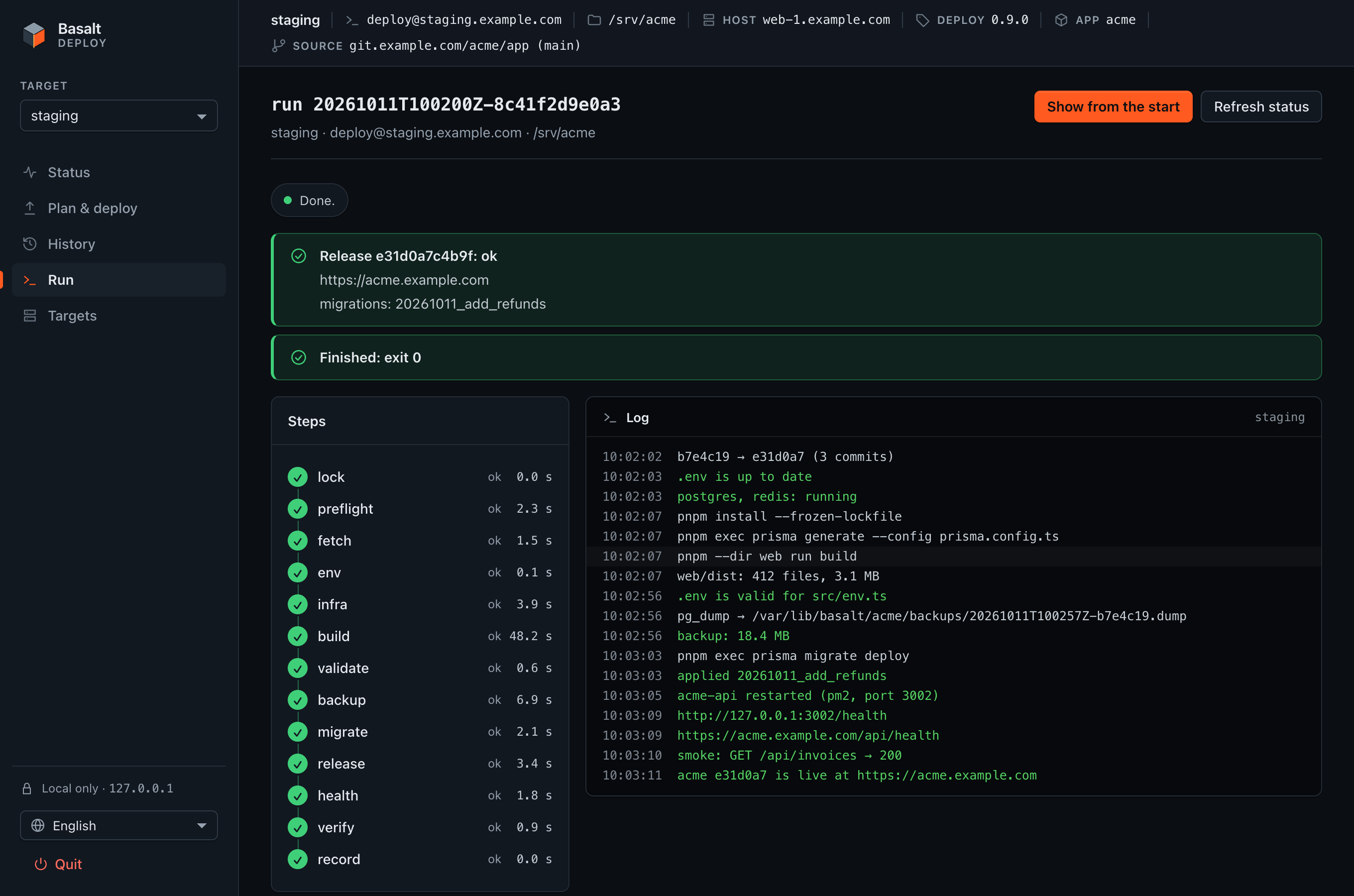
How it works
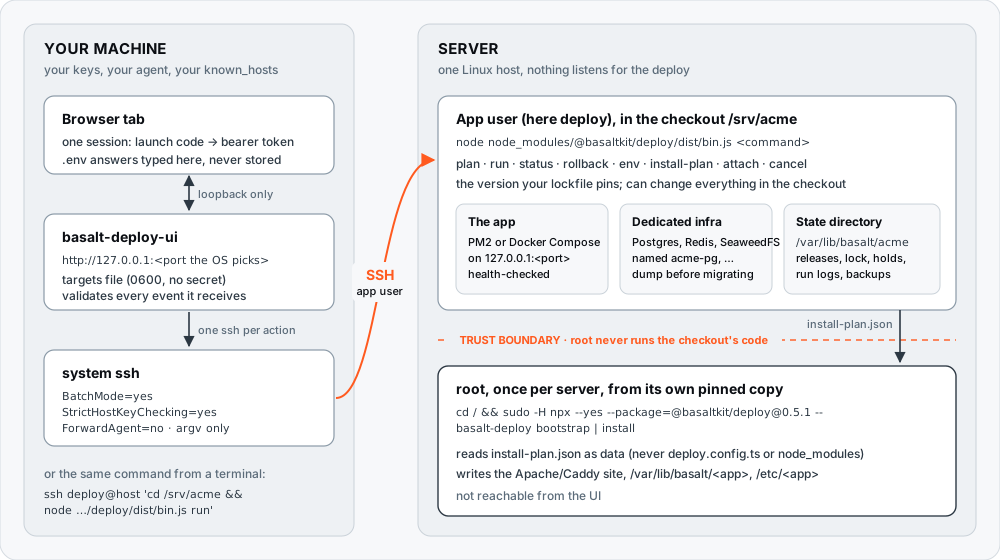
- No agent on the server. Every deploy is a plain command, run over SSH as the app user in the app's checkout:
node node_modules/@basaltkit/deploy/dist/bin.js <command>. The version is the one your lockfile pins. - The config is committed.
deploy.config.tsat the app root holds no secret.basalt-deploy init --domain=<host>writes it from the project. Thedeploy.config.tsreference documents every option. - Root is kept apart. Root runs only its own pinned copy of the tool, from outside the checkout, and only for
bootstrapandinstall. It never loadsdeploy.config.tsor the checkout'snode_modules, and it reads the app user's install plan as data. See Who runs what. - The UI adds no access. It listens on
127.0.0.1only and runs yoursshbinary with your keys and yourknown_hosts. It can do what your SSH account can do, and nothing more.
pnpm add -D @basaltkit/deploy # in the app, committed with the lockfileNever add the UI to the app
@basaltkit/deploy-ui must not go in the app's package.json, not even as a devDependency. The deploy runs the app's pnpm install on the server, which installs devDependencies, so the UI would land on every server. Run it with npx on your machine (below).
The first server
You need a fresh Ubuntu or Debian server with Node, the app's repository, and a user for the app. In this guide that user is deploy and the checkout is /srv/acme.
Bootstrap, with a pinned version
sudo adduser --disabled-password deploy && sudo git clone <repo> /srv/acme

# root runs its OWN copy, pinned to the version your lockfile records:
cd / && sudo -H npx --yes --package=@basaltkit/deploy@0.9.0 -- \
  basalt-deploy bootstrap --dir=/srv/acme --user=deploy --dry-run
# read what it would do, then run it again without --dry-run- Pin the exact version your
pnpm-lock.yamlrecords for@basaltkit/deploy.bootstrapwarns when the two differ. cd /and-Hmatter. Inside the checkout,npxwould pick the checkout's own copy, which the app user can change.-Hgives root its own npm cache instead of the user's.--diris required and is never taken from the working directory. It must be an absolute path with no symbolic link in it, made of letters, digits and. _ @ + -, holdingpackage.jsonand.git, and must not be a system directory (/,/srv,/home, …). Prefer a checkout under a root-owned directory (/srv/acme) to one in the user's home: a parent the user can write lets it swap the checkout for a link (the Apache vhost guards against it; Caddy cannot, andinstallwarns).
bootstrap installs only what is missing: base packages, Docker with compose, Node at engines.node, and the pnpm your lockfile records. It gives the checkout and the docker group to the user. Then it runs the user's steps as the user, in the checkout: pnpm install, env (it asks for what it cannot generate) and install-plan. Last, it adds swap and a firewall where needed and runs install. When a step fails, bootstrap stops there. Running it again redoes nothing that is already done.
The docker group is root on the machine
A container can mount /, so membership in docker is root in practice. bootstrap says so. The trust boundary protects against mistakes and a compromised checkout. It does not protect against the app user itself. Rootless Docker is the real fix, and it is a later step.
By hand: install-plan, then the root command
The same steps without bootstrap:
# as the app user (never root), in the checkout:
pnpm install
node node_modules/@basaltkit/deploy/dist/bin.js env           # writes the .env (asks once), starts the containers, validates
node node_modules/@basaltkit/deploy/dist/bin.js install-plan  # writes the install plan (data) and prints the root command

# once, as an administrator: the command install-plan printed, for example
cd / && sudo -H npx --yes --package=@basaltkit/deploy@0.9.0 -- \
  basalt-deploy install --plan=/srv/acme/.basalt/install-plan.json --user=deploy
install creates the state directory /var/lib/basalt/acme, writes the Apache or Caddy site, and gives the env files to the user. It prints what it will do before it writes anything.
Credentials, TLS and the first deploy
run fetches the code itself, so store the git credentials once, as the app user: git config credential.helper store && git fetch, or a read-only deploy key. With Apache the TLS certificate is yours to issue (certbot --dns-cloudflare -d <domain> -d '*.<domain>'). With caddy(), Caddy issues it. Then deploy:
sudo -u deploy -H sh -c 'cd /srv/acme && node node_modules/@basaltkit/deploy/dist/bin.js run'Use node, not pnpm exec
Run the app user's commands with node node_modules/@basaltkit/deploy/dist/bin.js. pnpm 12 and later rewrites pnpm-lock.yaml when the lockfile came from another pnpm, and the deploy refuses a modified tree. Wrap the command in a two-line deploy.sh if you like.
How the app gets its .env
With pm2(), the deploy gives the app the env.file it validated (.env by default, or an absolute path such as /etc/acme/api.env). pm2 never holds the values: it records the environment it is given, in its daemon and, on pm2 save, in ~/.pm2/dump.pm2. So the process gets only NODE_ENV, PORT, HOST, the file's path (BASALT_ENV_FILE) and a small preload in NODE_OPTIONS. Node runs the preload before the app's first module. It loads the file only in the processes pm2 manages (where pm2 sets pm_id), never in the pm2 CLI or its daemon.
- Precedence is the same as
node --env-file: what is already exported wins, soNODE_ENV,PORTandHOSTfrom the deploy beat the file. An app's own--env-fileordotenvstill works; loading twice changes nothing. - Children (
pnpm run→node, workers) inherit the values like any environment. - A file that cannot be read stops the app with one line,
[basalt-deploy] env.file … is not readable (ENOENT), never a boot without its secrets. NODE_OPTIONSset in the file is passed on before the preload: it would come too late for node otherwise.- Rotating a secret: edit the file, then
run(orpm2 restart <app>-api --update-env). After a reboot,pm2 resurrectreads the file again. - Opt out with
pm2({ loadEnv: false })when the app loads its environment itself. It then getsNODE_ENV,PORTandHOSTonly, and preflight warns when thestartscript shows no loader.
Before @basaltkit/deploy 0.10, the process got NODE_ENV, PORT and HOST only. validate read the file and passed, then the app booted without its secrets: EnvValidationError and a failed health check.
Everyday deploys from the terminal
Everything below runs as the app user, in the checkout. The output shown is real basalt-deploy output for the acme example app, taken from the package's own human-mode test transcripts (whose commits are aaaaaaa and bbbbbbb).
plan: what a run would do
plan runs every check, then lists what run would do. It asks nothing and changes nothing a run uses.
$ node node_modules/@basaltkit/deploy/dist/bin.js plan

==> preflight

==> plan — nothing below has run
    fetch: git fetch -- origin +refs/heads/master:refs/remotes/origin/master && git merge --ff-only refs/remotes/origin/master
    env: add APP_SECRET (generated)
    env: add PAYCO_CALLBACK_URL (derived from the domain/port)
    env: ask PAYCO_SECRET_TOKEN
    env: ask SUPPORT_EMAIL
    build: pnpm install (frozen), prisma generate --config prisma.config.ts, web build
    validate: src/env.ts against the new .env
    backup: skipped (backup.beforeMigrate is false)
    migrate: prisma migrate deploy + tenant:migrate
    release: pm2 acme-api on 127.0.0.1:3002
    health: http://127.0.0.1:3002/health (Host: acme.example.com), then https://acme.example.com/api/health
    commits: 3 to go out (aaaaaaa → bbbbbbb)
The last line is what the run would deploy: the commits between the checkout's HEAD and the tip of the branch on the remote. To read them, plan fetches the branch into a private ref (refs/basalt-deploy/preview, deleted again) and never into refs/remotes/<remote>/<branch>, the ref run merges from. The checkout, HEAD and the tracking ref stay as they were. A rewritten branch says so (the branch was rewritten — … run refuses it). If the list cannot be read (no network, a shallow clone, a commit a force-push took away), the line says unavailable and why. That never blocks the plan or the deploy. The list itself is in the --json result.
run: deploy
run goes through preflight, fetch, env, infra, build, validate, backup, migrate, release, health and record:
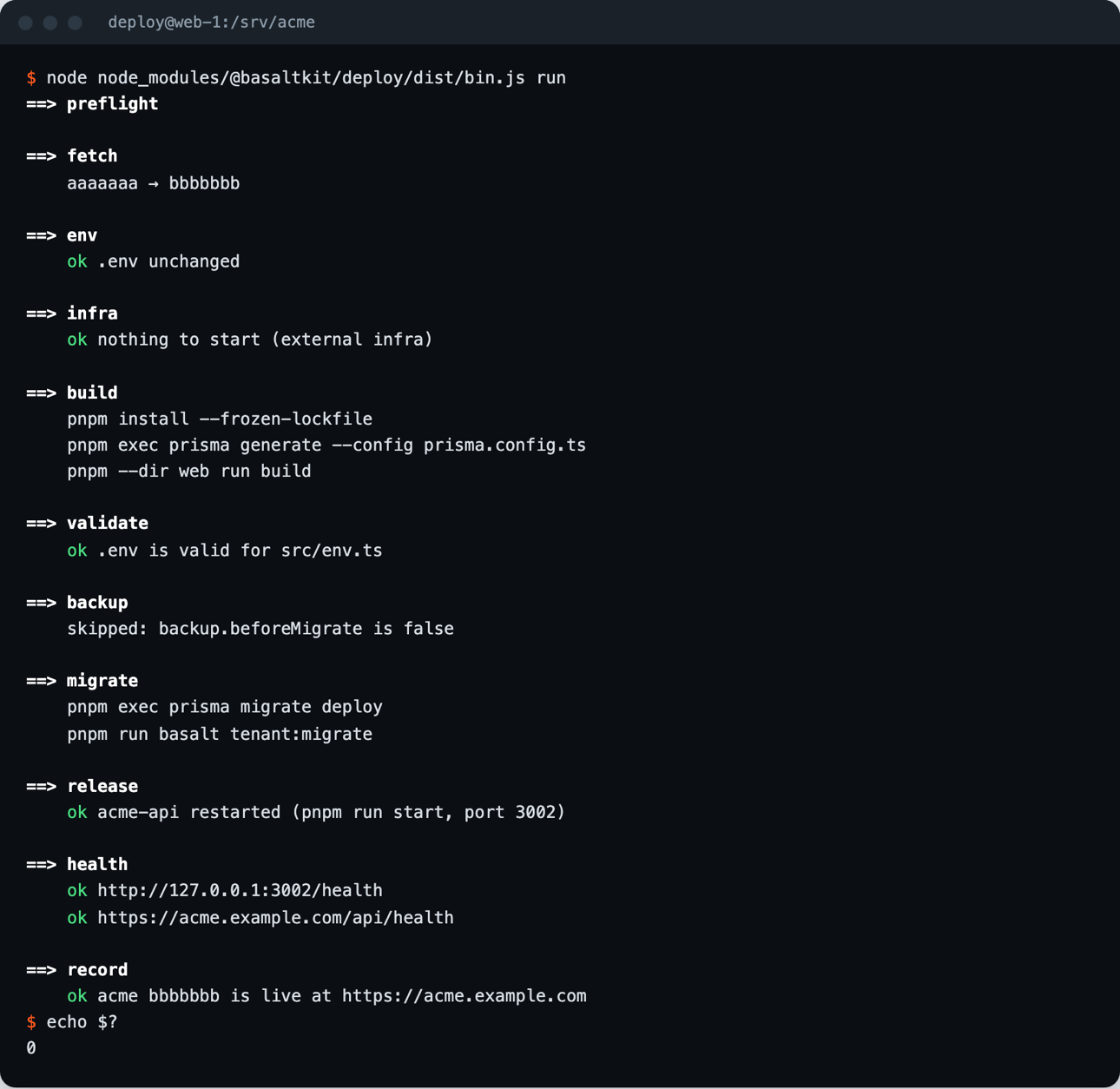
A preflight problem stops the run before anything changes:
$ node node_modules/@basaltkit/deploy/dist/bin.js run

==> preflight
    error [git] tracked files are modified on the server:
         M src/app.ts
      → git stash (or commit them where they belong); a deploy builds what is committed
    error preflight: 1 problem(s) above — nothing was changed
When the new release does not answer, the deploy puts the previous commit back and exits 1:
==> health
    error the app does not answer on http://127.0.0.1:3002/health

==> restoring the code to aaaaaaa
    pnpm install --frozen-lockfile
    pnpm exec prisma generate --config prisma.config.ts
    pnpm --dir web run build

==> release aaaaaaa
    ok acme-api restarted (pnpm run start, port 3002)
    ok back on aaaaaaa
A failed migration is recorded as failed-migration, and the deploy prints the pg_restore command for the dump it took before migrating. A release that applied a migration listed in destructive is never rolled back automatically.
status
status shows where the code comes from, the last releases (who deployed and from where), the process, the deploy lock and any hold:
$ node node_modules/@basaltkit/deploy/dist/bin.js status

==> acme — last 0 release(s)
    source: origin/main (github.com/acme/app)
    no deploy running
pm2 acme-api: online (pid 4242, /srv/acme)commits: what changed
commits lists the commits between two releases, or what a rollback would take out of production. It only reads: no lock, no fetch.
node node_modules/@basaltkit/deploy/dist/bin.js commits --from=<sha> --to=<sha>
node node_modules/@basaltkit/deploy/dist/bin.js commits --rollback [--to=<sha>]$ node node_modules/@basaltkit/deploy/dist/bin.js commits --rollback
commits: 2 would leave (bbbbbbb → aaaaaaa)
- bbbbbbb Fix rounding in VAT totals (Ana, 2026-10-20T11:40:03Z)
- 1f3c2d9 Invoices: add due_date column (Ana, 2026-10-20T10:02:41Z)--rollback resolves the target exactly as rollback does. Each list holds the whole ancestry, so the commits a merge brought in are listed too (the merge is marked [merge]). Each side is capped at 50 commits, with the true total. When history diverged, both sides are listed. Commit text is the author's: the deploy strips control characters and caps its length, and a value of the .env in a commit message is redacted under --json.
rollback and holds
node node_modules/@basaltkit/deploy/dist/bin.js rollback              # the last healthy release
node node_modules/@basaltkit/deploy/dist/bin.js rollback --to=<sha>   # a release you pick
A rollback restores code only: the database keeps its migrations. A manual rollback refuses a checkout with local edits, and it holds the commit it left. A scheduled run will not deploy that commit again until the branch moves on. To deploy it anyway, deliberately:
node node_modules/@basaltkit/deploy/dist/bin.js run --unholdWith nothing to go back to, the rollback fails:
$ node node_modules/@basaltkit/deploy/dist/bin.js rollback
    error no earlier release to go back to; pass --to=<sha>
One deploy at a time, and exit codes
run, env, rollback and install take a lock in the state directory. A second deploy is refused, and the message says who holds the lock. The first Ctrl-C stops run at the end of the current step. From the release on, the command finishes first.
| Exit code | Meaning |
|---|---|
0 | done |
1 | failed, or refused (a preflight problem, a held commit, a failed release) |
3 | another deploy holds the lock; nothing was done |
130 | stopped by a signal (a second signal ends the process at once: 130/129/143) |
Useful options: --skip=fetch,backup,tls, --config=<file>, --actor=<name> (recorded with the release; default $BASALT_DEPLOY_ACTOR, else $USER). --json switches to machine mode: NDJSON events, used by the UI and by scripts. Machine mode also gives you detached runs: run --json=1 --detach, attach <runId> --json --follow, and cancel <runId>. See the package README.
Deploying from the local UI
The UI needs a server that was deployed once from a terminal, as above, and an SSH account (the app user) that you can already reach with ssh.
Start it
On your machine, never on the server:
$ npx @basaltkit/deploy-ui@0.5.0
basalt-deploy-ui: listening on http://127.0.0.1:53119/ (this machine only)
basalt-deploy-ui: targets in ~/.config/basalt/deploy-targets.json
It opens your browser with a one-time code in the URL, valid for 120 seconds. With --no-open, it prints the URL instead. On a machine shared with other users, use --pair: the browser opens without the code, and you type the short pairing code the terminal shows. Pin an exact version, because this tool handles your deploy secrets. Other options: --targets=<file>, --ssh=<absolute path>, --idle-minutes=<n> (default 15). There is no --host and no --port option: the UI always listens on 127.0.0.1, on a port the OS picks.
The UI stops after 15 idle minutes. An open live log or a running command keeps it alive. To stop it yourself, use Quit on the page or press Ctrl-C. Detached runs go on on the server.
Add a target
A target is one server: an SSH destination and the checkout's directory. In Targets, choose Add a target:
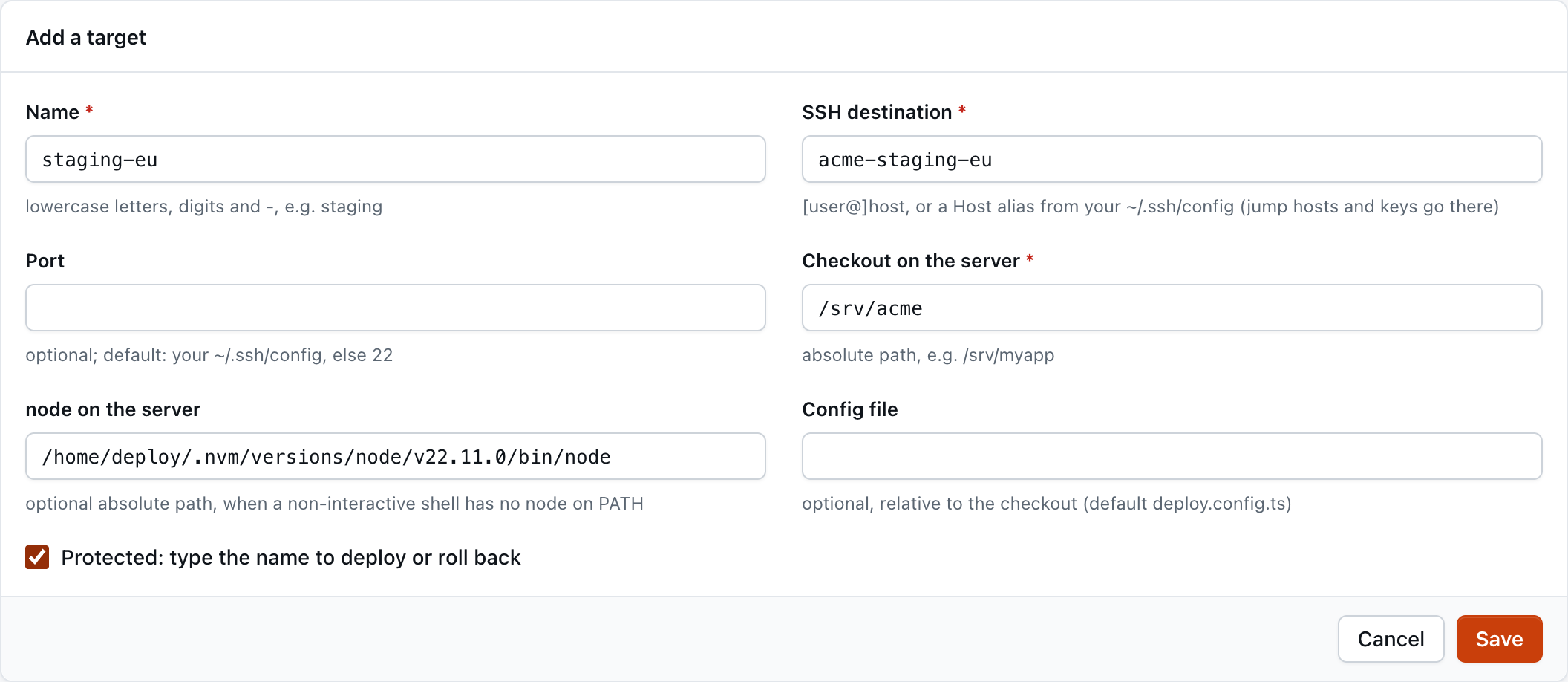
| Field | |
|---|---|
| Name | a-z, 0-9, -. The UI's key; it is never put in a command. |
| SSH destination | [user@]host, or a Host alias from your ~/.ssh/config |
| Port | optional; otherwise your ~/.ssh/config, else 22 |
| Checkout on the server | the absolute path of the app's checkout |
| node on the server | optional absolute path, for nvm |
| Config file | optional, relative to the checkout (default deploy.config.ts) |
| Protected | deploy and rollback need the target's name typed |
Targets live in your config directory, in ~/.config/basalt/deploy-targets.json (%APPDATA%\basalt\ on Windows), written 0600, never in the app repository. The file holds no secret. It names where your key and the .env answers you type are sent, so a commit to a shared repository must not be able to change it.
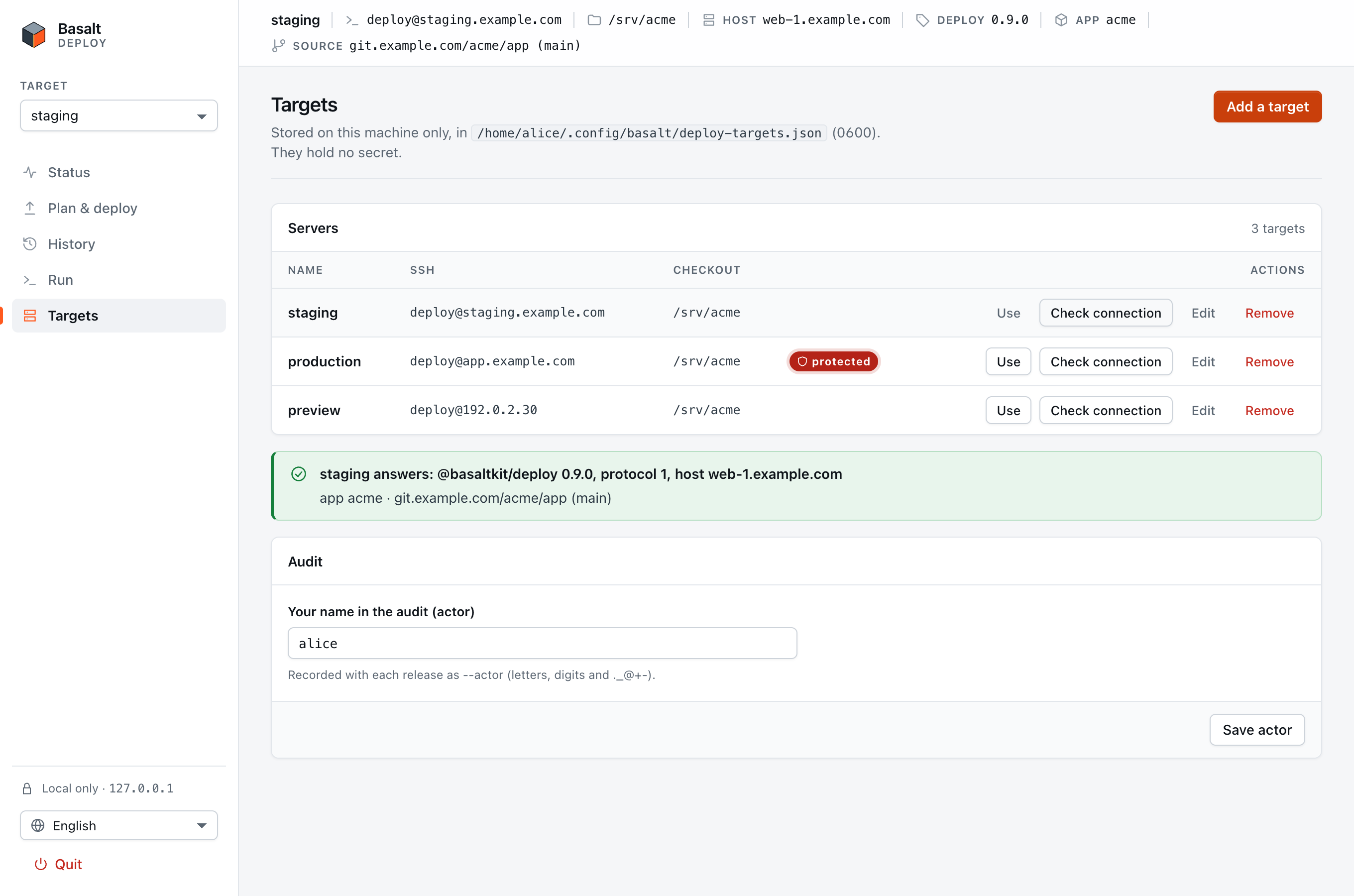
Then choose Check connection. A working target answers with the deploy version, the protocol and the server's host name. Under it you see which app the target really is: the app's name and where its code comes from (github.com/acme/app (main), from @basaltkit/deploy 0.9.0):
SSH keys: ~/.ssh/config
The UI runs ssh in batch mode: it never asks for a password, a passphrase or a host-key confirmation. Keys, jump hosts and proxies go in ~/.ssh/config, and the target names the alias:
Host acme-prod
  HostName prod.example.com
  User deploy
  Port 2222
  IdentityFile ~/.ssh/acme_deploy
IdentitiesOnly yesIdentityFilewithIdentitiesOnly yesmakes ssh offer only that key. WithoutIdentitiesOnly, ssh offers every key in your agent first, and a server with a lowMaxAuthTriescan refuse you before it sees the right one.- A key with a passphrase must be in your agent:
ssh-add ~/.ssh/acme_deploy(on macOS,ssh-add --apple-use-keychain). - Check from a terminal first.
ssh acme-prodmust work without a prompt. The UI does exactly what that command does.
The first connection: known_hosts
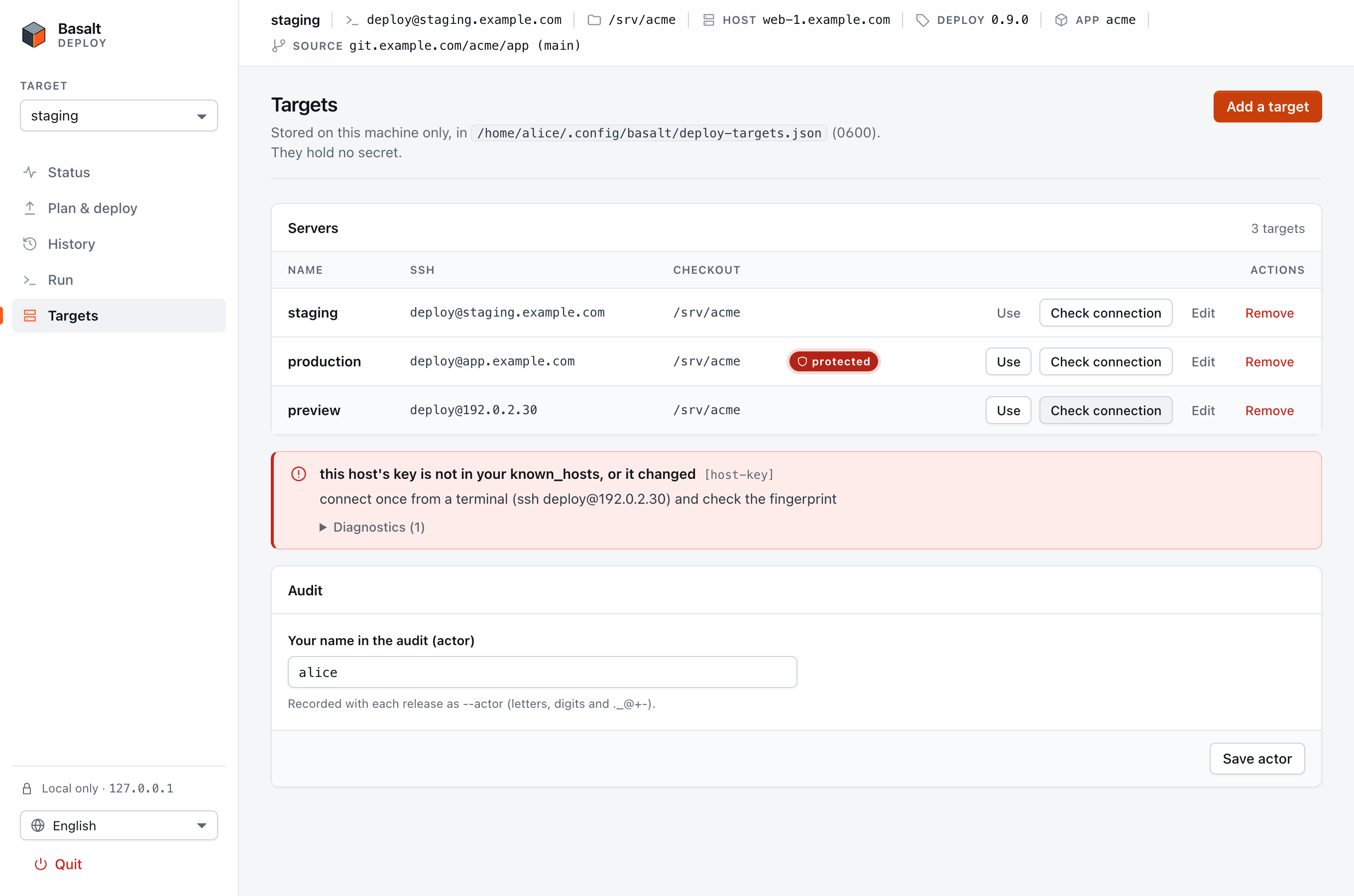
The UI always passes StrictHostKeyChecking=yes, so it refuses a host you have never verified, whatever your config says (accept-new does not apply). Connect once from a terminal, compare the fingerprint with the server's own (ssh-keygen -lf /etc/ssh/ssh_host_ed25519_key.pub, run on the server), and answer yes:
ssh acme-prod trueUntil you do, Check connection shows the host-key error:
node under nvm
ssh host cmd starts a non-interactive shell, which does not read the files where nvm, fnm or volta put node on PATH. If the check reports no-node, ask a login shell on the server where node is, and put that path in the target's node on the server field:
ssh acme-prod 'bash -lc "command -v node"'
# /home/deploy/.nvm/versions/node/v22.11.0/bin/node
From @basaltkit/deploy 0.5.1 on, the deploy also puts that directory first on PATH for everything it starts (pnpm, the app's scripts). Enable the pnpm your packageManager declares in that Node with corepack enable.
Status
Status shows what runs on the server now: the current release, the process, the lock and the last run. It loads once when you choose a target. Choose Refresh to load it again; the UI does not poll.
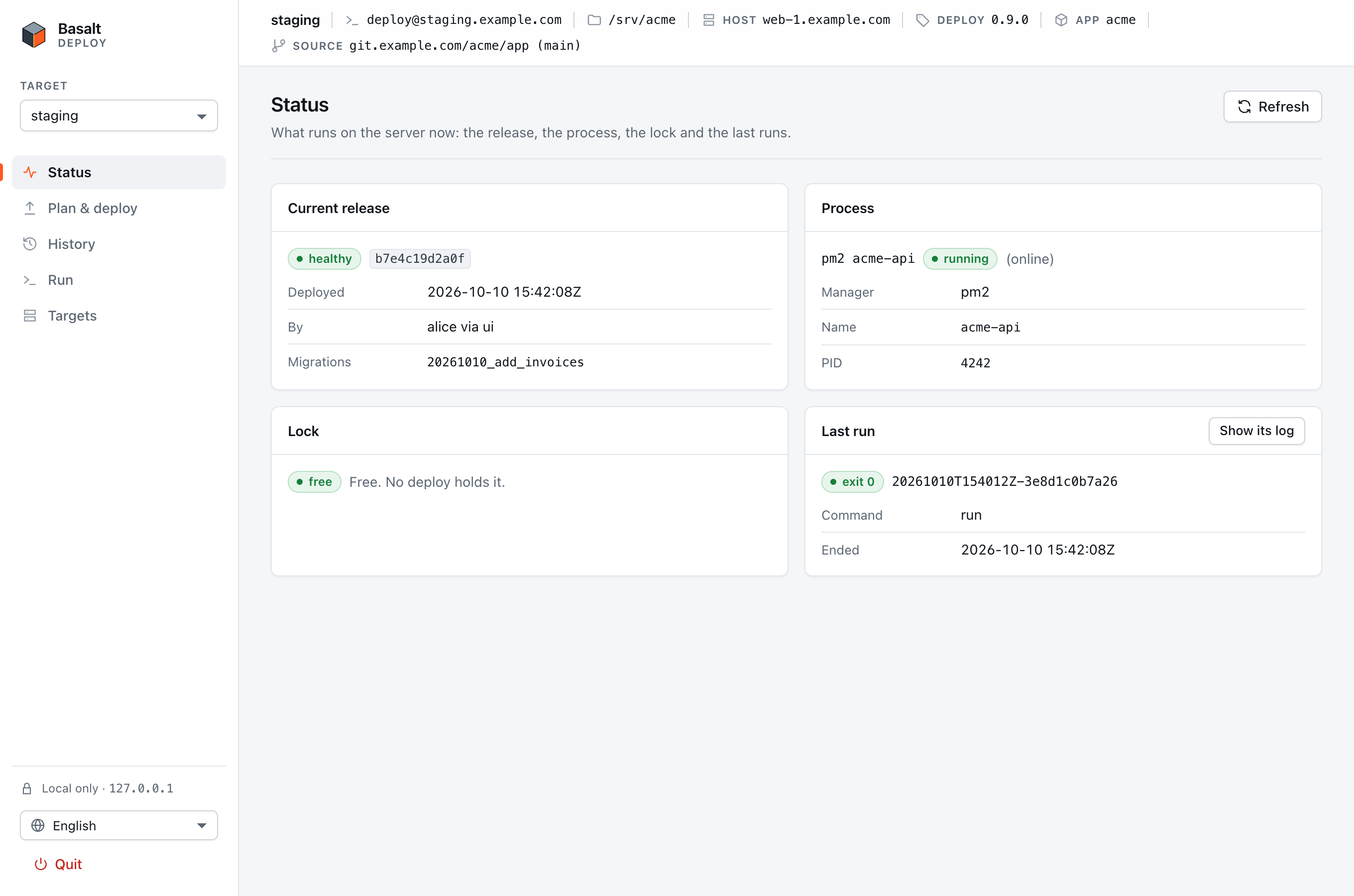
The bar at the top always shows where you are: the target, its SSH destination and checkout, and, once the server answered, its host name, the deploy version, the app and its source (the remote's address without credentials, and the branch).
When the server's deploy is older
The page uses features from recent @basaltkit/deploy versions: the commit lists (0.8.0) and the app's source (0.9.0). When the server runs an older one, the deploy version in the bar turns amber, and Status and Check connection say what is missing and how to update:
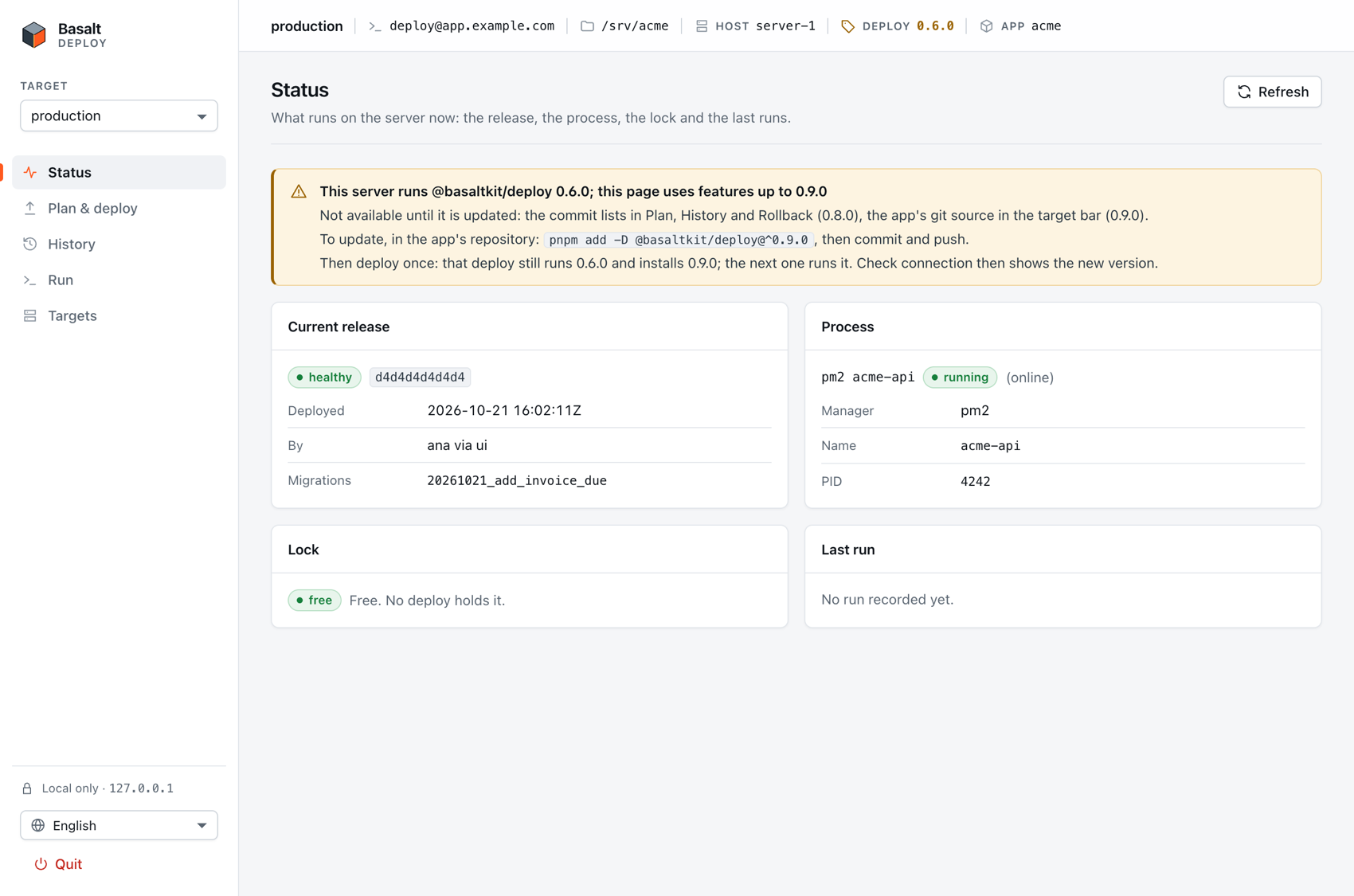
The server always runs the version the app's lockfile pins, never the newest on npm. So, in the app's repository, run pnpm add -D @basaltkit/deploy@^0.9.0, then commit and push. Then deploy once: that deploy still runs the old version, and its pnpm install --frozen-lockfile installs the new one. From the next command on, the server runs it. Nothing is blocked meanwhile: a missing feature is just not shown.
Plan & deploy
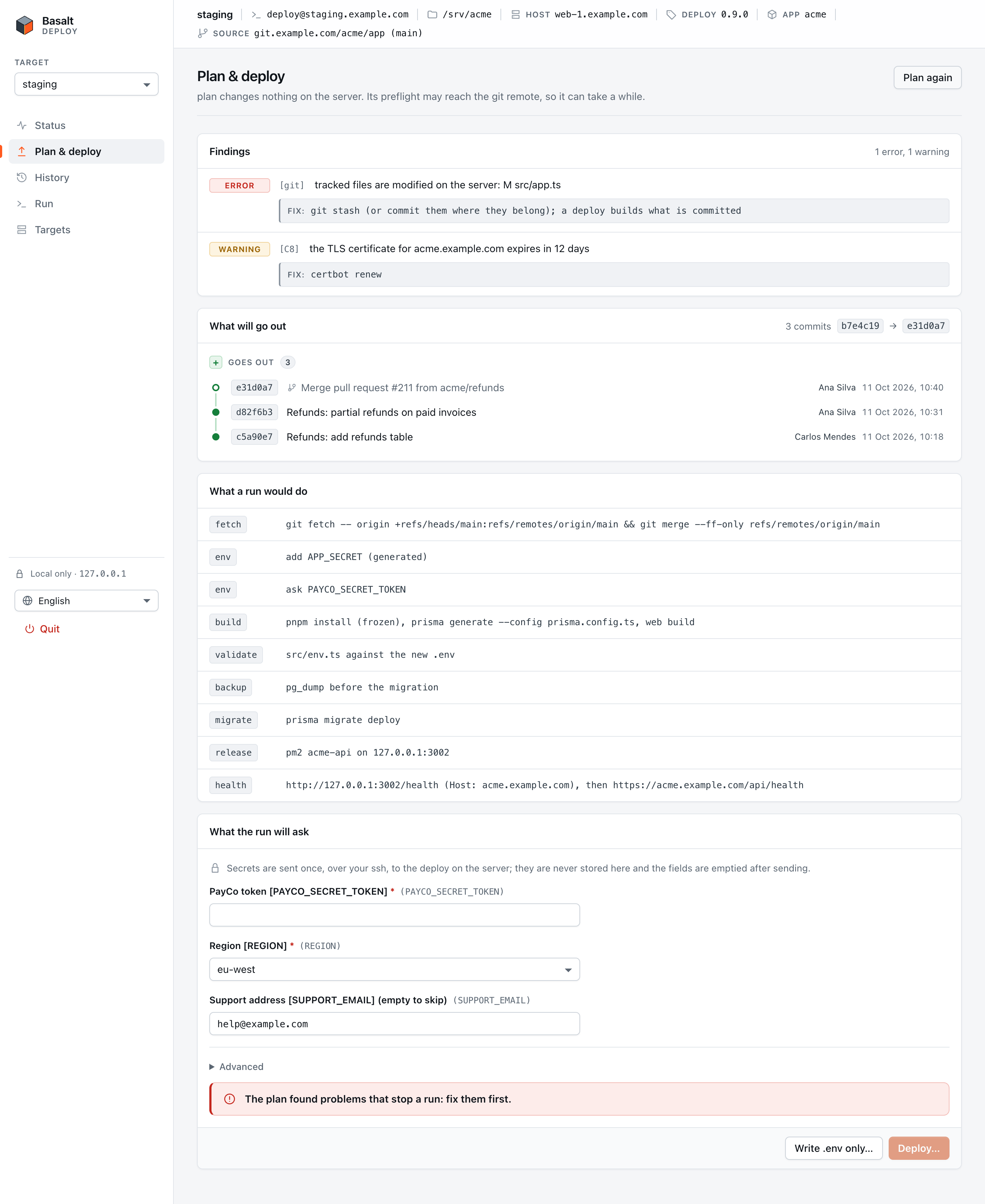
Plan & deploy → Run plan runs plan on the server. Nothing changes there. Findings come first, each with its check ID and a fix. An error blocks the deploy until you fix it on the server and choose Plan again:
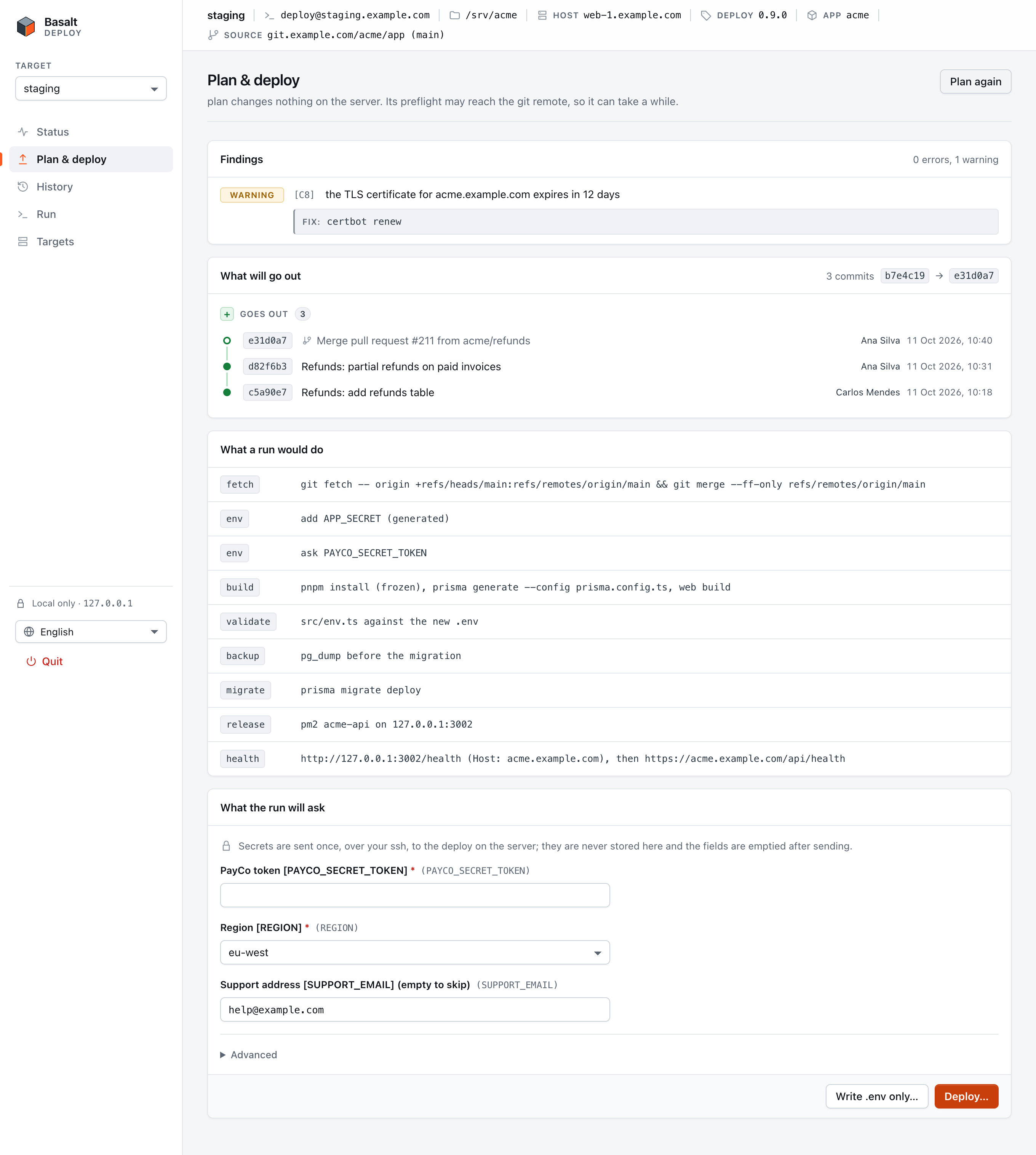
With no error, the page shows the plan and the form for what the run will ask:
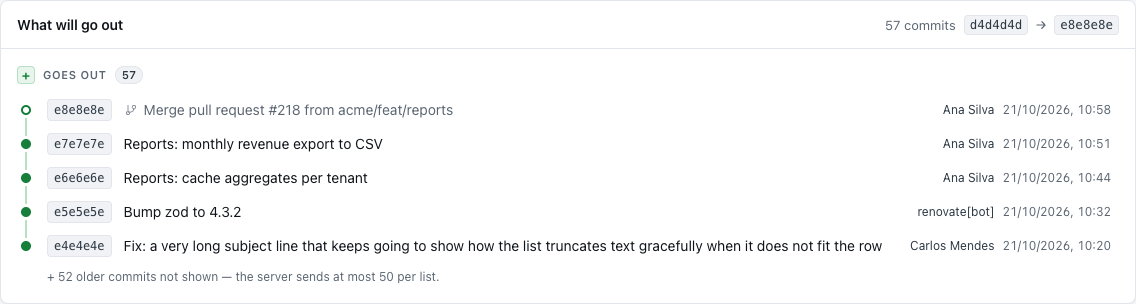
What will go out lists the commits the run would deploy, newest first, with author and date. A merge is marked, and the commits it brings in are listed with it. If the branch was rewritten on the remote, the card warns that a run would refuse it and lists the commits that only the server has. If the list cannot be read, the card says why, and Deploy… still works.
The .env form
The questions come from env.ask in deploy.config.ts. Secret answers are password fields. They are sent once, over your ssh, to the deploy on the server, and the fields are emptied after sending. The UI never stores them.
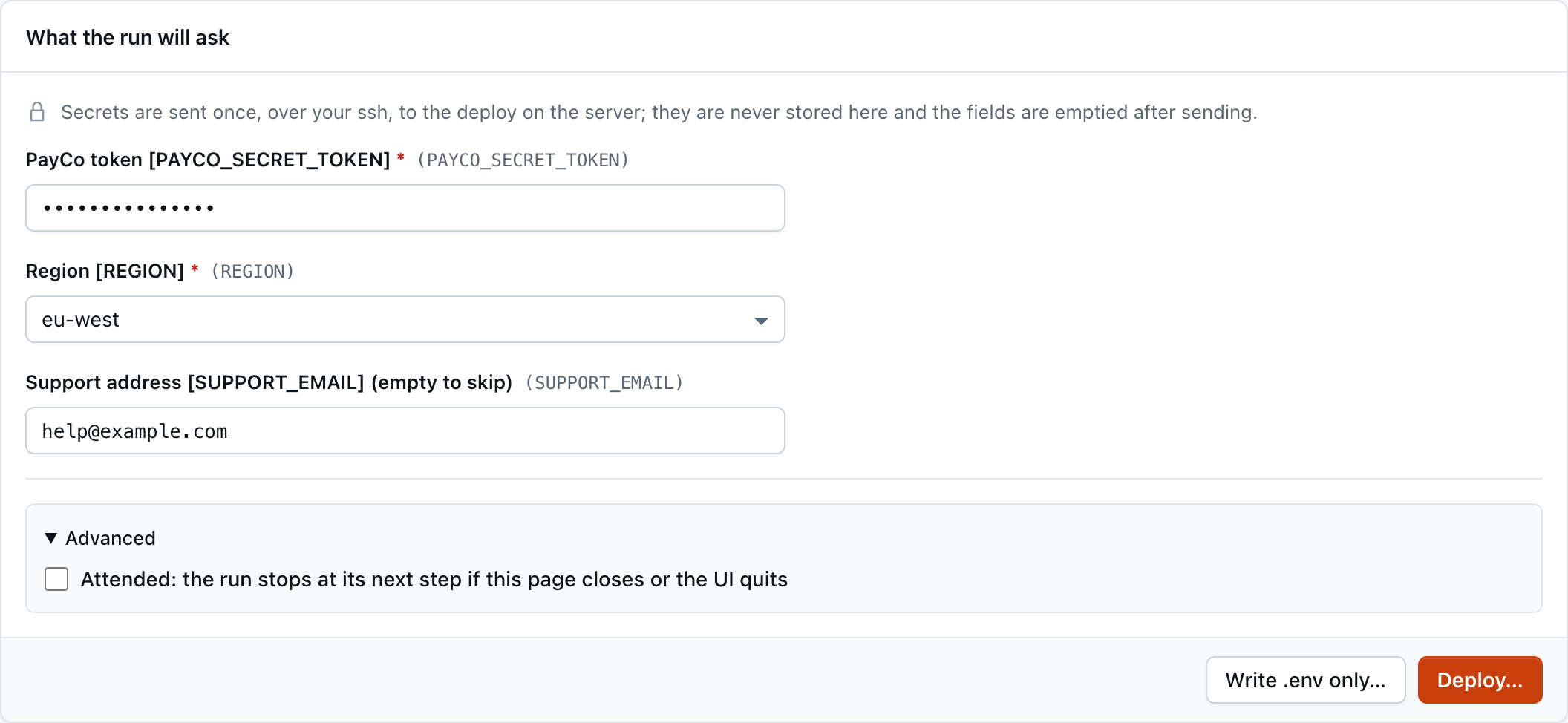
- Write .env only… runs
env: the.envand the dedicated infra, with nothing built or restarted. Use it for a first setup. - Advanced → Attended runs the deploy attached to the page: it stops at its next step if the page closes or the UI quits. By default a run is detached, so a closed laptop lid does not stop it.
- When a commit is held, a Deploy anyway checkbox appears. It is
run --unhold.
Confirm
Deploy… opens a confirmation that repeats the destination, the checkout, the server's host name and the app. It says so when the run will migrate the database. The focus starts on Cancel, never on the destructive button:
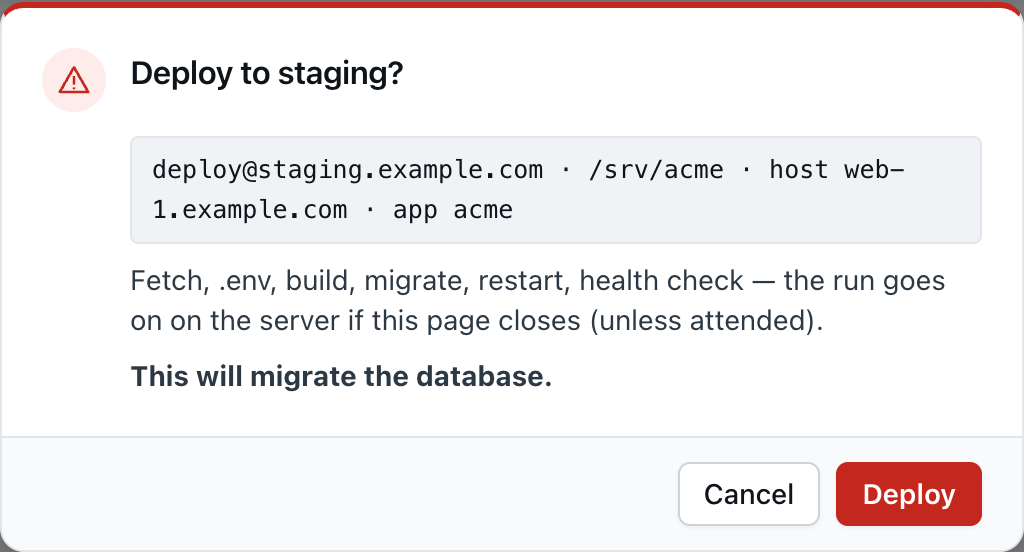
If the targets file changed after the dialog opened, the UI sends nothing and shows the new values.
The live run
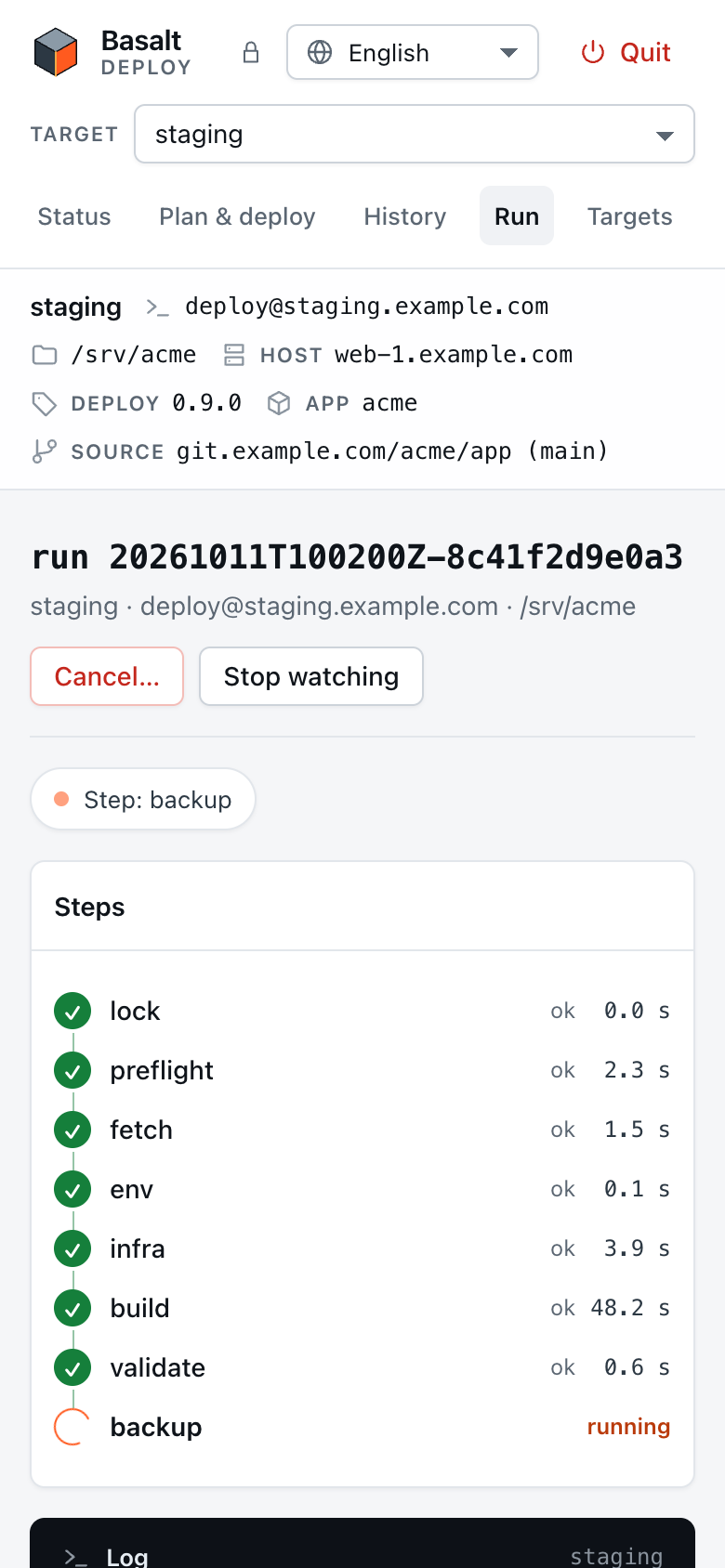
The run page shows the steps with their timings and the live log. Build and migration output is tagged with its source ([pnpm], [prisma], [vite]):
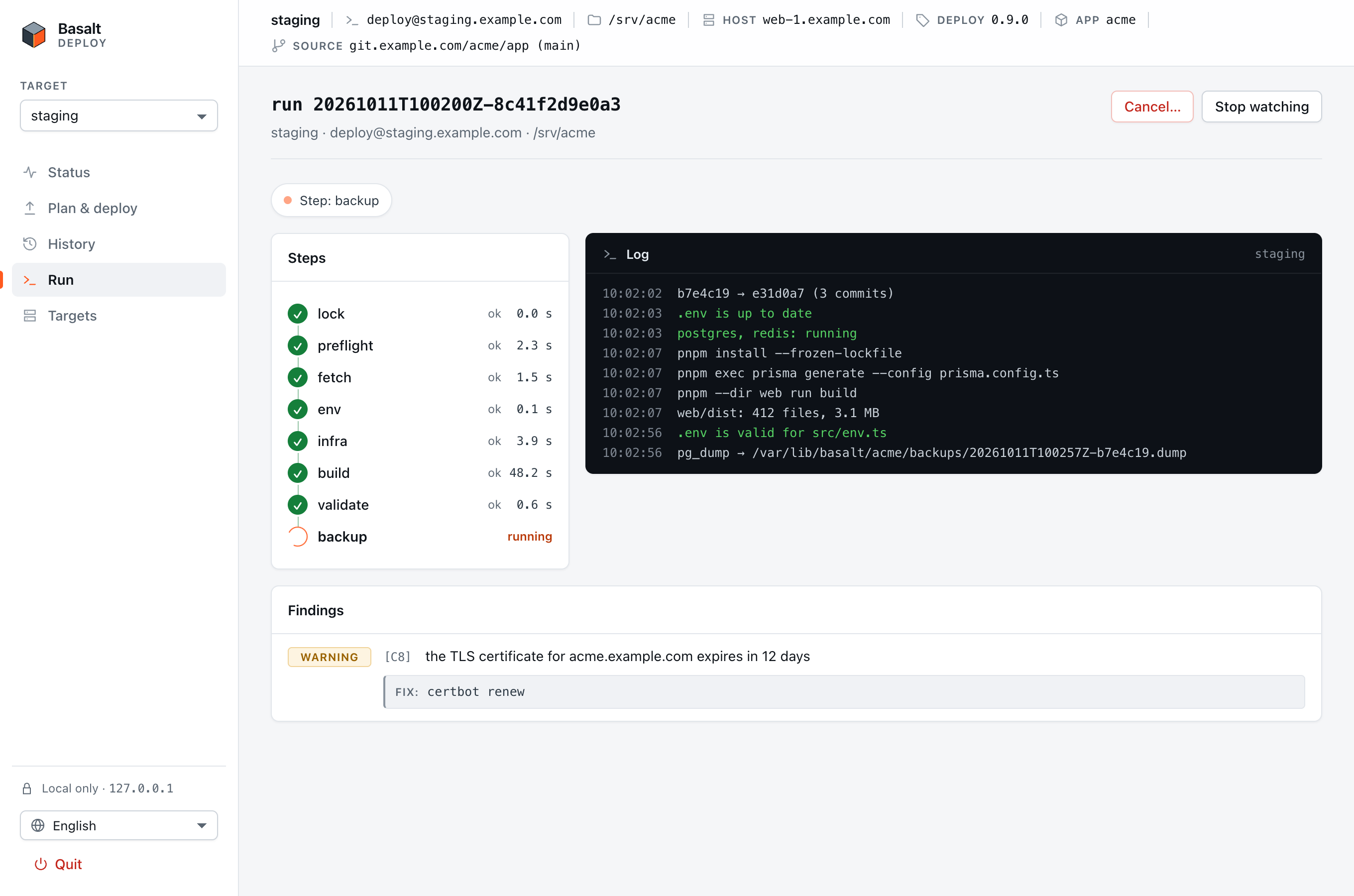
When it ends, the page shows the release, its URL and its migrations:
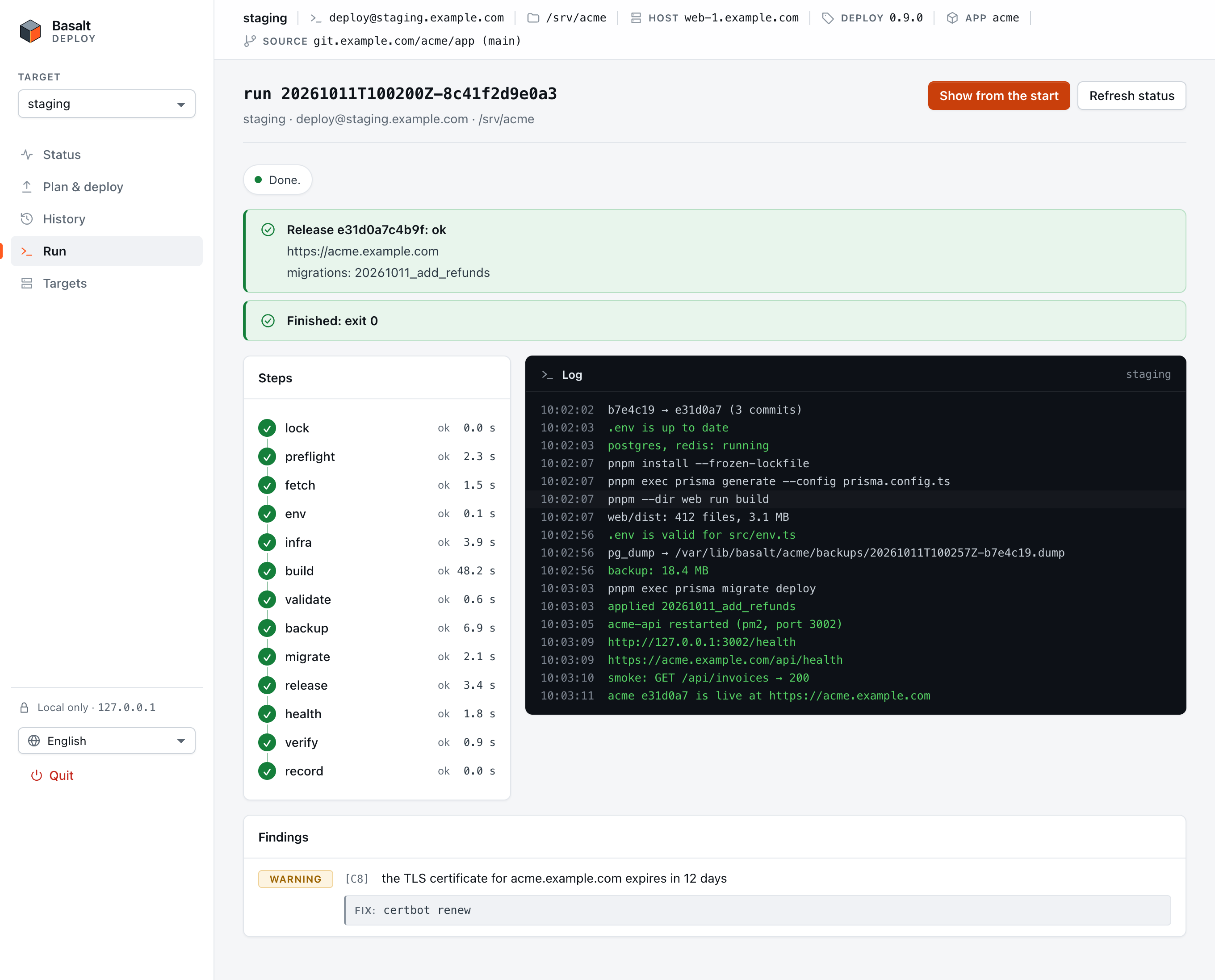
Re-attach and cancel
- A dropped connection re-attaches by itself, from the next event, without a gap or a duplicate line.
- Stop watching leaves the run going on the server. Re-attach follows it again, and Show from the start replays the whole log.
- From another session (a new tab, after a restart of the UI, or from a colleague's terminal), Status shows the Active run with an Attach button, and the Last run with Show its log.
- Cancel… asks the deploy to stop at the next step boundary before the migration. From the migration on, the deploy finishes first. Cancel again (stop now)… opens a second, separate confirmation: it ends the deploy mid-step, a migration may be left half-applied, and the log holds the restore command for the pre-deploy dump. The server decides which cancel it is, so a cancel already sent from a terminal counts.
History and rollback
History lists the last 10 releases the server recorded: the commit and its subject, status, actor, how it ran (ui, ssh, …), the client address, the migrations and the dump taken before them. The arrow on a row opens the commits that release brought in compared with the one before it. They are read once from the server and kept for the session.
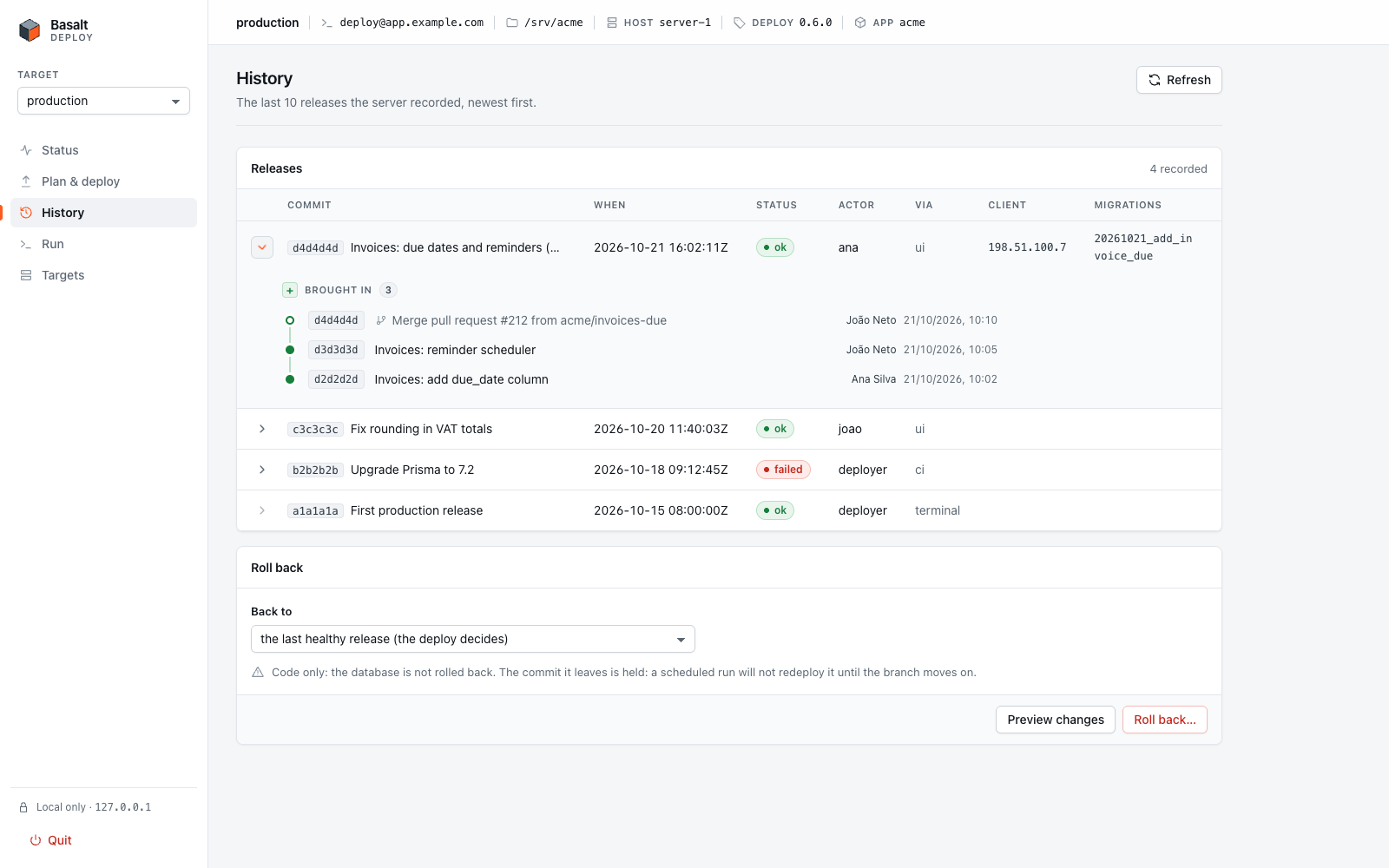
Roll back goes to the last healthy release, or to one you pick under Back to. As in the terminal, it restores code only and holds the commit it leaves. Preview changes lists the commits that would leave production. Roll back… reads that list again, right then, and shows it in the confirmation:
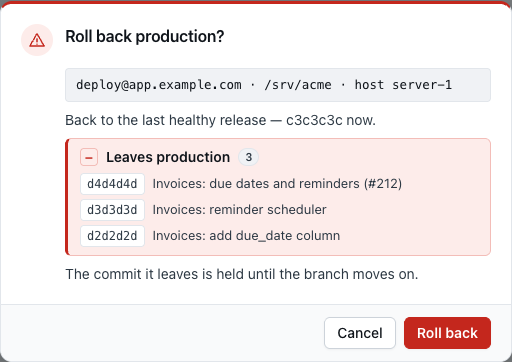
The page sends the same request as without the preview: with the last healthy release, the deploy still chooses the target when it runs. If it chooses another commit than the one previewed (a deploy landed in between), the run says so. A preview that fails never blocks the rollback. The rollback runs detached, and the page opens its live log.
Protected targets
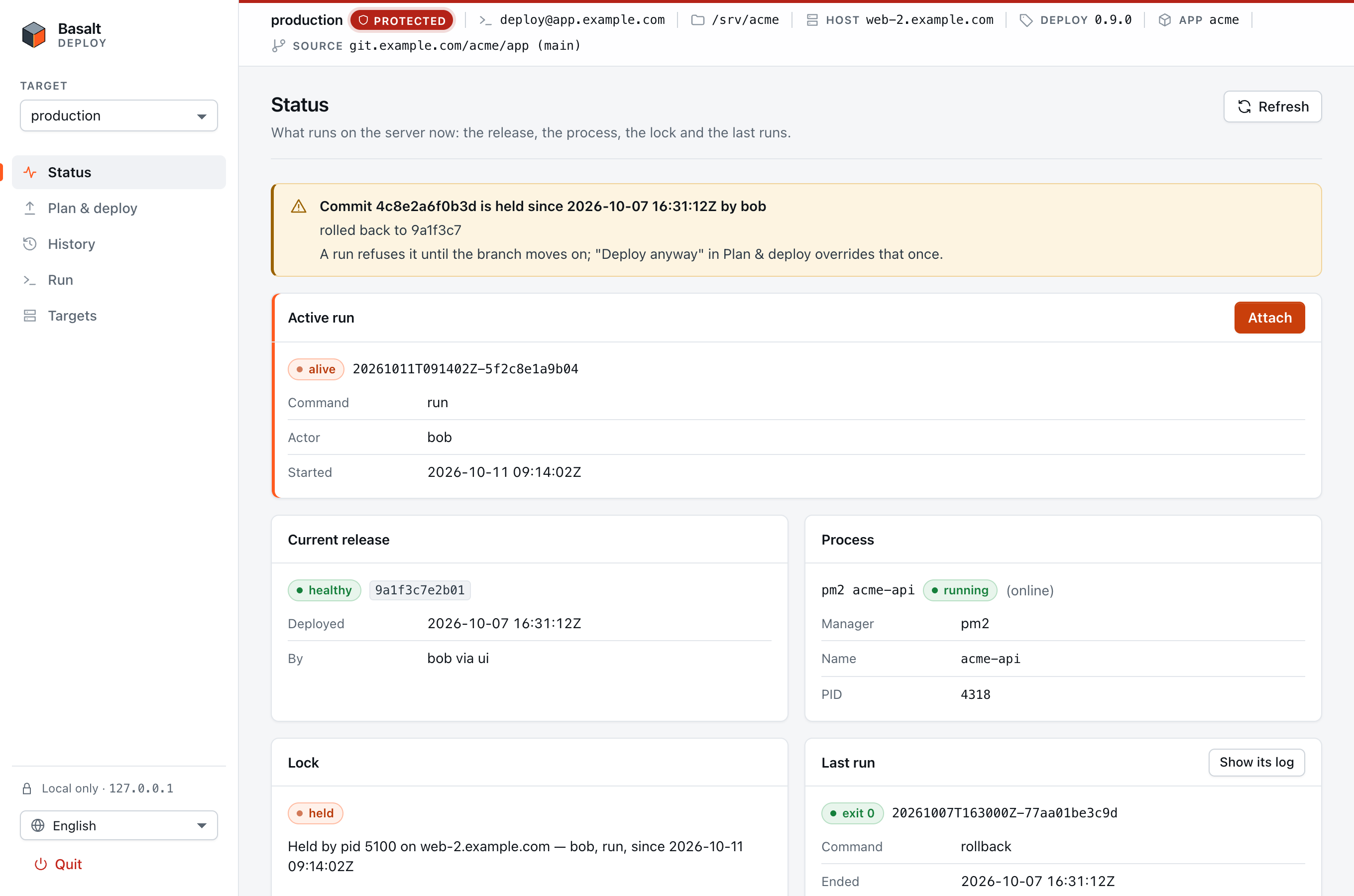
Mark production Protected. The top bar then shows a red strip and a PROTECTED badge on every page. Status shows the hold banner, an active run from someone else, and the lock it holds:
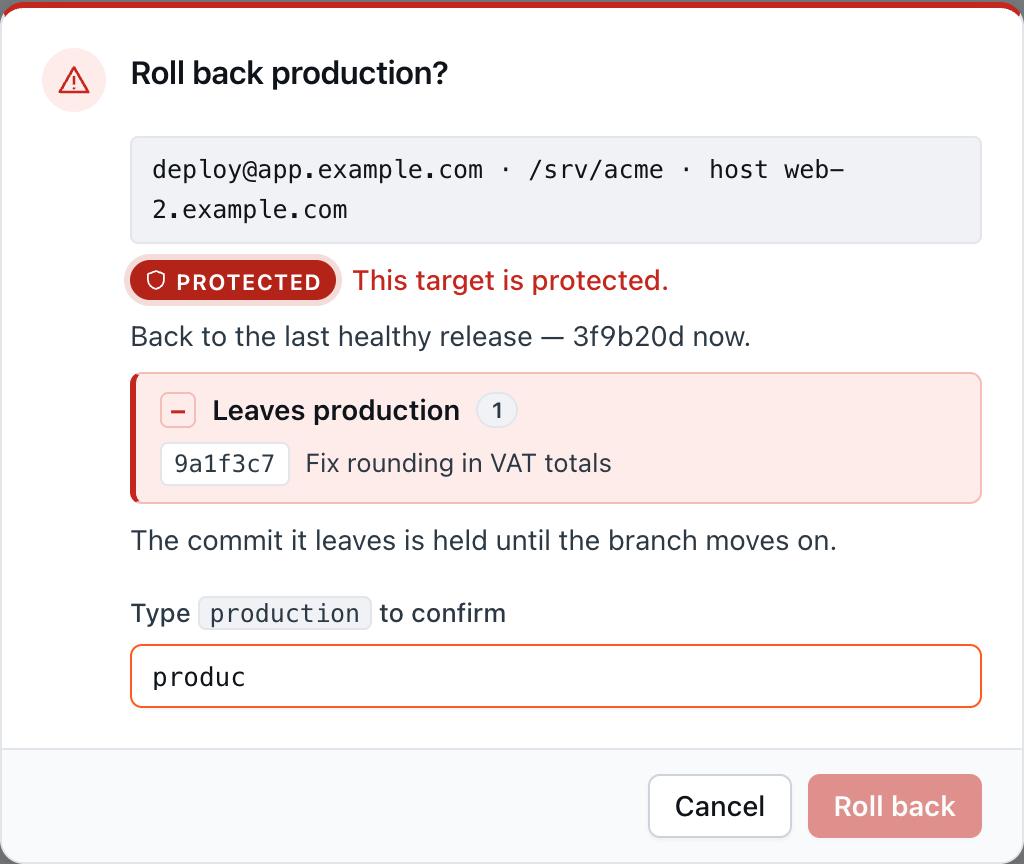
Deploy, Write .env only and rollback on a protected target require the target's name typed in the dialog. The button stays disabled until the name matches:
Language
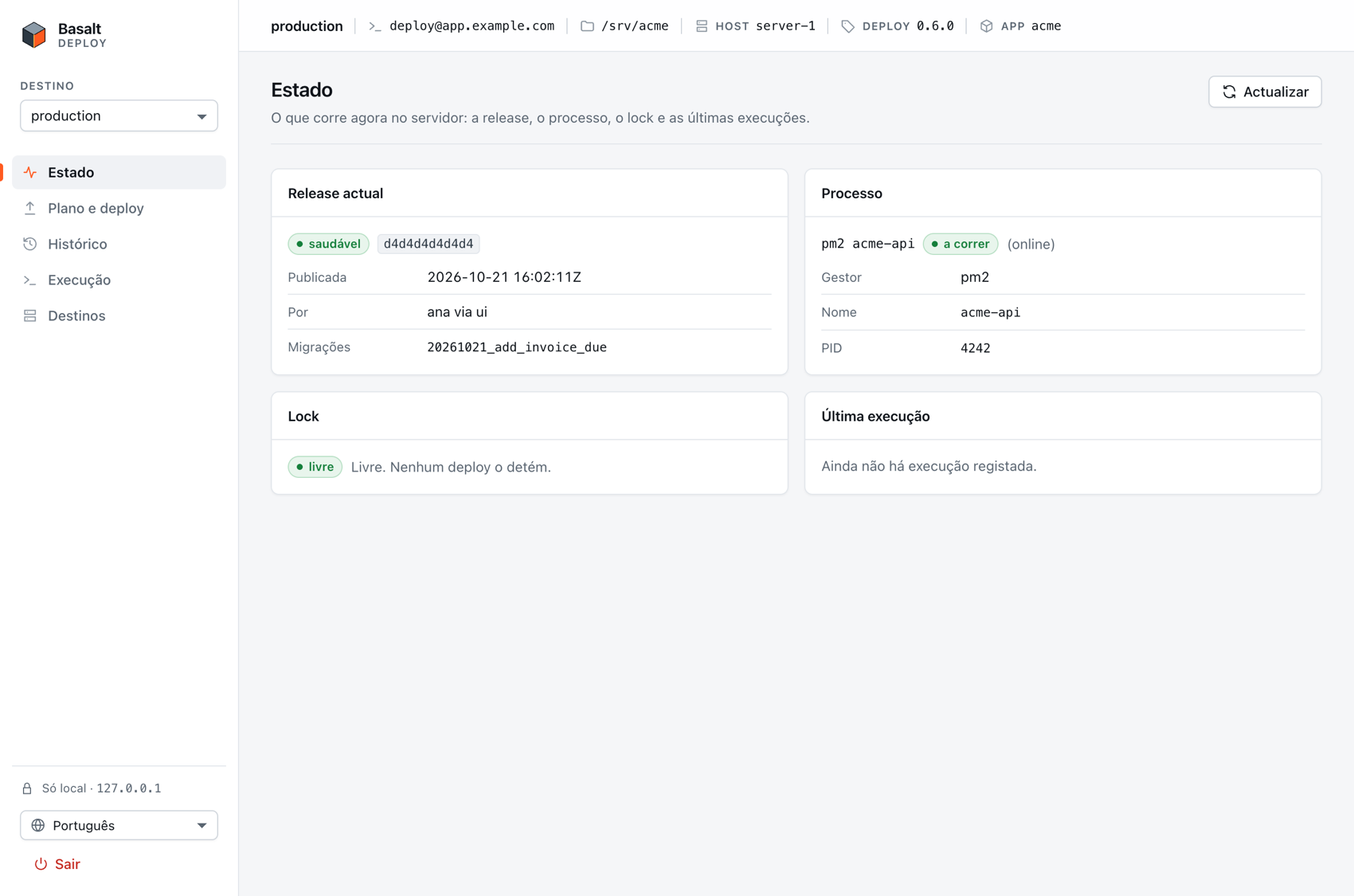
The page speaks English and Portuguese. Before a session it follows your browser's language (pt-AO, pt-PT, pt-BR → Portuguese; anything else → English). The switcher at the foot of the sidebar changes every screen at once, and the choice is kept as "locale" in your targets file for the next start. Dates follow your browser's variant of the language.
Only the page's own words are translated. What the server's @basaltkit/deploy prints — step titles, log lines, findings, its errors — is shown exactly as it came, and so is any refusal of the local server the page does not know.
On a phone or a narrow window
The layout folds into one column: the navigation becomes tabs and the target bar wraps.
Troubleshooting
Connection errors show a short code in brackets. The UI never tries to fix them itself; each one maps to something you do from a terminal.
| The UI says | Code | Do |
|---|---|---|
| the server refused your SSH key | auth | Is the key in your agent (ssh-add -l)? Does ssh <destination> work from a terminal? Set IdentityFile and IdentitiesOnly yes (SSH keys). |
| your SSH key needs its passphrase, and ssh runs here in batch mode | passphrase | Add the key to your agent: ssh-add. |
| this host's key is not in your known_hosts, or it changed | host-key | Connect once from a terminal and check the fingerprint (known_hosts). If the key changed and you did not expect it, stop and find out why. |
| node was not found on the server for a non-interactive shell | no-node | Set the target's node on the server to an absolute path (nvm). |
| the checkout has no installed @basaltkit/deploy | no-deploy | Run pnpm install in the checkout once from a terminal. |
| the target's dir does not exist on the server | no-dir | Check the target's checkout path. |
| the host name does not resolve | resolve | Check the SSH destination, or the Host alias in ~/.ssh/config. |
| the connection timed out / was refused | timeout / refused | Is the server up, and is sshd listening on that port? |
| no protocol output from the server | Does the account have a POSIX login shell (sh, bash, zsh)? Is @basaltkit/deploy recent enough to have --json? |
These come from the deploy's own preflight, and appear as findings in the plan and in a run's log:
| Finding | Meaning | Fix |
|---|---|---|
[state-dir] /var/lib/basalt/<app> is missing or not reachable by this user | The deploy's state (release history, lock, dumps) stays in the checkout. | Run install-plan, then the root command it prints. install makes the directory the user's own (0700) and its parent enterable. |
[dumps] database dumps go to … inside the checkout, and git does not ignore them | A dump of the whole database could be committed. | Add /.basalt/ to .gitignore, or run install once, so dumps go to /var/lib/basalt/<app>/backups. |
[dumps] … inside the Docker build context | A COPY . . would put them in the image. | Add .basalt to .dockerignore, or run install once. |
[dumps] dump(s) left in backups/predeploy (the old place) | Nothing prunes them any more. | Move them next to the new ones, or delete them. |
[C9] node is not on PATH / older than engines.node | The toolchain the deploy will call is missing or too old. | Set the target's node path, or install the Node engines.node asks for. |
[C9] pnpm is not on PATH, or another major than packageManager declares | corepack enable. It then runs the declared version. | |
[C9] pm2 / docker compose is not available to this user | npm i -g pm2 as the app user, then pm2 startup; for compose, check Docker and the user's docker group. |
A held commit (run refused with held) is not an error to fix: push a fix (the hold ends when the branch moves on), or use Deploy anyway (--unhold). An exit code 3 (locked) means another deploy is running. Its holder is on the Status page.
Security: what the UI can and cannot do
It can do what your SSH account can do on the server, as the app user: status, plan, env, run, attach, cancel and rollback, each as one ssh invocation of the app's own lockfile-pinned node node_modules/@basaltkit/deploy/dist/bin.js <command> --json=1 --via=ui.
It cannot:
- run root's commands, or code-writing ones.
install,bootstrapandinitare not reachable from the UI. - be reached from another machine. It listens on
127.0.0.1and a port the OS picks, never0.0.0.0orlocalhost, and nothing ever listens on the server. - be driven by another web page. It accepts one browser session: a one-time launch code, exchanged for a token kept in that tab, not a cookie. Every request is checked for the exact
Host,Originand token, and the UI never sends CORS headers. The CSP is strict and framing is denied. - weaken your ssh. It always passes
BatchMode=yes,StrictHostKeyChecking=yesandForwardAgent=no, with argv only and--before the destination. - keep your secrets. They travel browser → loopback →
sshstdin, never in argv, the environment, a file, a log or the URL. The deploy redacts them from every event it writes on the server. - trust server output. Every line is validated and rendered as text only, so a build that prints a fake event shows up as a plain log line.
Its limits: on a machine shared with other users, the launch code is visible in the browser opener's arguments for an instant. A claim by anyone else makes your tab fail loudly, and the terminal says so; --pair removes that window. When the terminal says the UI stopped, close the tab. The full threat model is in RFC 0009.
Who runs what: the trust boundary
| Who | Runs | Can change |
|---|---|---|
| the app user | env, run, rollback, plan, status, install-plan; the app itself | the checkout (deploy.config.ts, node_modules, every file), its .env, the state directory |
| root | bootstrap, install, from a copy of the tool that root owns | everything |
Root never runs the app user's code. install reads the data-only install plan and validates every field again. As root, install and bootstrap refuse to run from files another user can change (the checkout, a user's npm cache, a per-user Node). The app user's commands refuse to run as root.
See also
- Going to Production: the checklist, and Build & ship for the Dockerfile route.
- PostgreSQL backups: scheduled backups beyond the pre-migration dump.
deploy.config.tsreference: every option, its default and an example.@basaltkit/deployand@basaltkit/deploy-uiREADMEs: Docker Compose apps, external infra and hooks in depth.- RFCs 0006 (the pipeline), 0008 (machine mode), 0009 (the UI) and 0010 (SeaweedFS in place of MinIO).