
Package reference
Mirrors the package README (single source). Install @basaltkit/deploy-ui v0.5.1 — npm · source.
@basaltkit/deploy-ui
A local web UI for @basaltkit/deploy. It runs on your machine, listens on 127.0.0.1 only, and drives each server over your own ssh — your keys, your agent, your known_hosts — as the app user, exactly as you would type the commands yourself. Nothing is installed or started on the server; the UI can do what your SSH account can do, and nothing more.
Design and threat model: RFC 0009 (it builds on the machine protocol of RFC 0008 and the pipeline of RFC 0006).
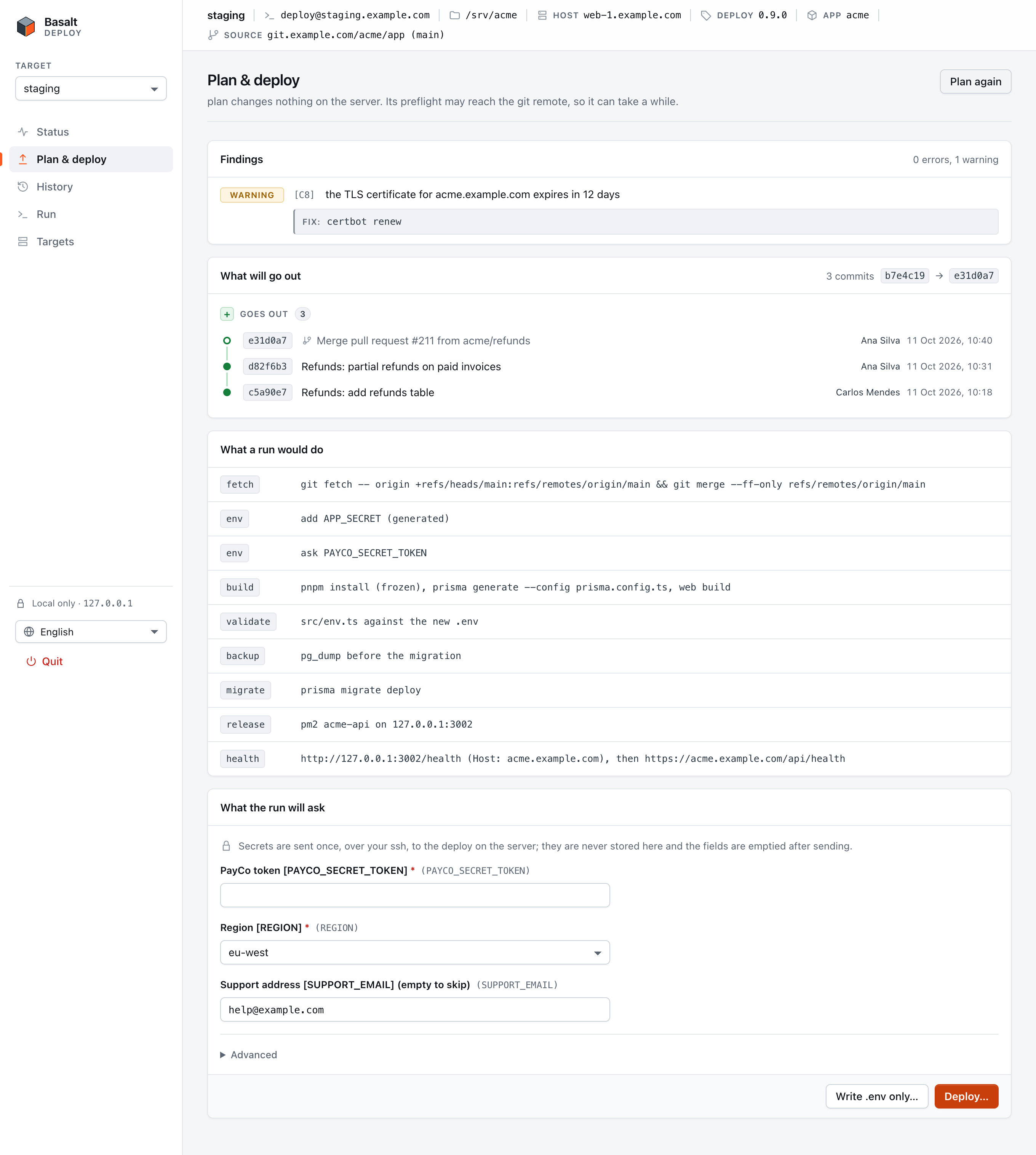
Illustrated guide: Deploying from the local UI covers adding a target, SSH keys and known_hosts, node under nvm, plan and deploy, the live run, cancel, rollback and protected targets, with a troubleshooting table (Português).
Start it
npx @basaltkit/deploy-ui@<exact version>
# or: npm install -g @basaltkit/deploy-ui@<exact version> && basalt-deploy-ui
It prints listening on http://127.0.0.1:<port>/ and opens your browser with a one-time code. Pin an exact version: it is a tool that handles your deploy secrets.
> Never add it to an app's package.json — not even as a devDependency. > @basaltkit/deploy runs the app's pnpm install on the server, which > installs devDependencies: the UI would land on every server. > basalt-deploy ui (in the app) only prints this reminder.
| Option | |
|---|---|
--targets=<file> | the targets file (default below) |
--ssh=<absolute path> | the ssh client (default: ssh from PATH; on Windows %SystemRoot%\System32\OpenSSH\ssh.exe, else the first ssh.exe in an absolute PATH entry, never the current folder) |
--no-open | print the URL instead of opening the browser |
--pair | open the bare URL and type a short code the terminal shows (shared machines) |
--idle-minutes=<n> | stop after n idle minutes (1–240, default 15) |
There is no --host and no --port: see the security model.
What a server needs
- The app checked out and deployed once with
@basaltkit/deployfrom a terminal (the UI speaks protocol 1: the release with RFC 0008's--json). - An SSH account (the app user) you can already reach with
sshfrom a terminal, with a key in your agent: the UI runssshin batch mode and never asks for a password, a passphrase or a host-key confirmation. - A POSIX login shell for that account (
sh,bash,zsh).
Targets
Kept in your config directory — $XDG_CONFIG_HOME/basalt/deploy-targets.json (default ~/.config/basalt/…), %APPDATA%\basalt\deploy-targets.json on Windows — written 0600, never in the app repository: a target names where your key and the .env secrets you type are sent, and a commit to a shared repository must not be able to repoint it. The file holds no secret.
{
  "version": 1,
  "actor": "alice",
  "locale": "pt",
  "targets": [
    { "name": "staging", "ssh": "deploy@203.0.113.10", "dir": "/srv/myapp" },
    { "name": "production", "ssh": "myapp-prod", "port": 2222, "dir": "/srv/myapp", "node": "/usr/local/bin/node", "protected": true }
  ]
}| Field | |
|---|---|
name | a-z, 0-9, -; the UI's key, never put in a command |
ssh | [user@]host or a Host alias of your ~/.ssh/config — jump hosts, identity files and proxies go there |
port | optional, 1–65535 |
dir | the checkout on the server, absolute |
node | optional absolute path, when a non-interactive shell has no node on PATH (nvm); from @basaltkit/deploy 0.5.1 the deploy puts its directory on PATH for pnpm and the app's scripts too |
config | optional --config path, relative to the checkout |
protected | deploy and rollback need the target's name typed |
actor | recorded with each release (--actor); default: your OS user name |
locale | the page's language, en or pt, as you last picked it; default: your browser's language |
Every field has a closed grammar (no leading -, no spaces, no ..); an unknown field is refused, not ignored. The UI refuses a targets file that is a symbolic link, writable by other users, or owned by another user (root included). It also refuses one in a directory, up to /, that another user owns or that others can write to without the sticky bit: whoever can replace the file chooses where your secrets go. A deploy, a .env write or a rollback carries the target your confirmation showed. If the file changed since then, nothing is sent, and the page shows the new values.
What it does
Per target: check the connection (which also names the app and where its code comes from); status (current release, process, lock, active and last run, a hold); plan (findings, what a run would do, the questions it would ask, and the commits that will go out); the .env form (secrets in password fields, never stored, emptied after sending); deploy — detached by default, so a closed laptop lid does not stop it, or attended; the live log, which re-attaches after a dropped connection without a gap or a duplicate (even one cut mid-line); cancel (a second cancel, separately confirmed, stops it at once; the server decides which one it is, so a cancel already sent from a terminal counts); rollback, to the last healthy release or one picked from history (the last 10 releases, each with its subject and, one click away, the commits it brought in), with the commits that would leave production listed before you confirm; and "Write .env only" for a first setup.
When the server's @basaltkit/deploy is older than a feature the page uses, the version in the target bar turns amber. Status and Check connection also list what is missing, give the exact pnpm add -D for the app, and say that the first deploy still runs the old version.
The page speaks English and Portuguese: your browser's language until you pick one in the sidebar, then the one kept in the targets file. Only its own words are translated; what the server's deploy prints is shown as it came.
Each action is one ssh invocation of the app's own, lockfile-pinned node node_modules/@basaltkit/deploy/dist/bin.js <command> --json=1, with --via=ui so the release record says how it was made. install, bootstrap and init (root's or code-writing commands) are not reachable from the UI.
Security model
The server is reachable by every process on your machine and is a target for every page your browser opens. So:
- Loopback only.
127.0.0.1and a port the OS picks; never0.0.0.0,::orlocalhost. Nothing ever listens on the server. - One browser session. A 256-bit one-time launch code in the URL fragment (never sent in a request, valid 120 s) is exchanged once for a 256-bit session token, held in that tab's
sessionStorageand sent asAuthorization: Bearer— not a cookie: cookies are not port-scoped and would reach your other local servers. A second claim is refused and printed in the terminal. - The server proves itself. The exchange also gives the page a key that it never sends. After every load, and before any
.envanswer leaves the page, the server must answer a fresh challenge with an HMAC under that key. Once the UI has stopped, another program may take its port. It may have seen the token, but it never has the key, so it gets no answer. When the server is gone or fails the check, the page empties its forms, forgets the session and says so. - Every request checked: exact
Host(DNS rebinding), API callsPOSTonly withapplication/json, an exactOrigin,Sec-Fetch-Site: same-originwhen sent, and the token in constant time; 1 MiB bodies; no CORS, ever. Static files come from a fixed list read at start. - Strict CSP (
script-src 'self', no inline script or style,frame-ancestors 'none'),X-Frame-Options: DENY,no-store. - System
ssh, argv only, withBatchMode=yes,StrictHostKeyChecking=yes(a host you never verified is refused, whatever your config says),ForwardAgent=no,ForwardX11=no,ClearAllForwardings=yes,PermitLocalCommand=no,-e none, and--before the destination. The remote command is built from validated pieces, each single-quoted. ssh (and the browser opener) start in your home directory. On Windows they are always absolute paths, because Windows looks a baressh.exeup in the current folder first. - Secrets travel once: browser → loopback request body →
sshstdin. Never in argv, the environment, a file, a log, the URL orsessionStorage; the buffers the UI owns are zero-filled after the write. The deploy redacts them from every event on the server. - Server output is data: every line is validated (
parseEvent,seqcontinuity, 1 MiB per line); text is rendered as text only and cleaned of escapes, control and bidi characters; a build that prints a fake event is a log line. - Idle shutdown after 15 minutes without a request (an open live log or a command still running keeps it alive). Quit from the page or
Ctrl-C; detached runs go on on the server. - Destructive confirmations open with the focus on Cancel (or on the typed name for a protected target), never on the destructive button.
Limits: on a machine shared with other users, the launch code is visible in the browser opener's arguments for an instant — a claim by anyone else makes your tab fail loudly and the terminal say so. There, start it with --pair: the browser opens the bare URL and you type an 8-character code the terminal shows (no look-alike letters, 2 minutes, 5 tries, then the UI must restart), so nothing secret passes through another process's arguments (RFC 0009 Q1). JavaScript strings cannot be wiped from memory. The server's proof is checked just before an answer is sent, not inside the same request. After a reload, the page you get is whatever answers on the port. When the terminal says the UI stopped, close the tab (RFC 0009 §15).
Troubleshooting
Every message, with its fix, is in the guide's troubleshooting section.
| The UI says | Do |
|---|---|
| the server refused your SSH key | ssh-add, then check ssh deploy@host works from a terminal |
| your SSH key needs its passphrase | add it to your agent: ssh-add |
| this host's key is not in your known_hosts | connect once from a terminal and check the fingerprint |
| node was not found on the server | set the target's node to an absolute path |
| no protocol output from the server | a POSIX login shell? @basaltkit/deploy recent enough (RFC 0008)? |